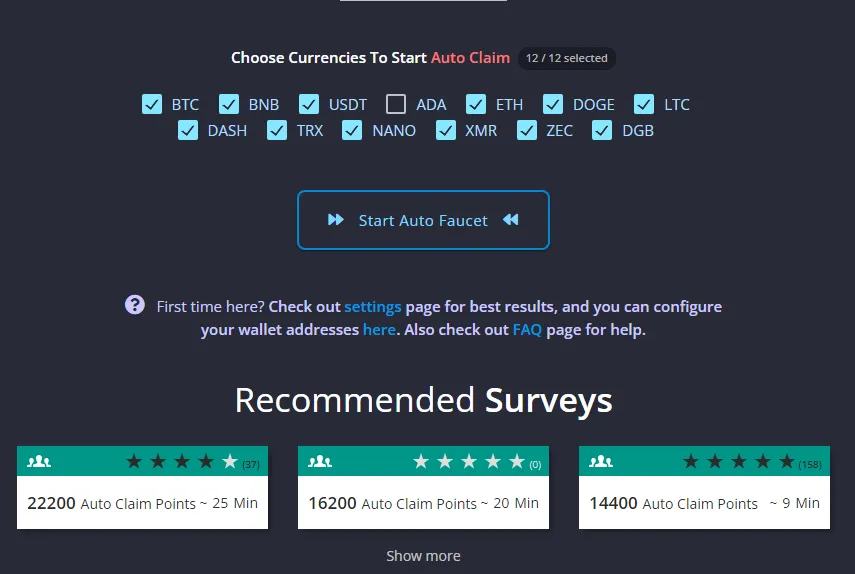
FireFaucet's Auto Faucet changed completely with v5. It now runs on FireFaucet's own servers, which means you can start it, close the website and keep earning until the ACP or Fuel assigned to the session runs out.
I've personally used FireFaucet and earned through it, and this is exactly why the Auto Faucet is the feature I find most interesting. I can earn ACP actively, start a session and let FireFaucet handle the conversion in the background.
FireFaucet Auto Faucet at a glance
| Feature | Current FireFaucet Auto Faucet |
|---|---|
| Runs in the cloud | Yes |
| Browser must stay open | No |
| Main resource converted | ACP |
| Resource powering runtime | Fuel |
| Fuel consumption | 1 Fuel per minute |
| Payout Boost | 1x to 4x |
| Currency slots | 4 initially, up to 12 |
| Happy Hour | 50% more from Auto Faucet claims during four weekend windows |
| Mining required | No |
What is the FireFaucet Auto Faucet?
The Auto Faucet is FireFaucet's automatic conversion system. It consumes Auto Claim Points, uses Fuel to keep the session running and steadily adds value to the supported currency balances you select.
The automation happens on FireFaucet's servers. It is not crypto mining, and it does not use your device's CPU, GPU or battery to generate rewards. Your computer does not need to sit there burning electricity just to keep the Auto Faucet alive.
You can stop and collect whenever you want. If the ACP or Fuel allocated to the session is exhausted first, the session finishes and waits for you to collect.
Can FireFaucet Earn Crypto While You Sleep?
Yes. FireFaucet's current Auto Faucet runs server-side, so after you start it you can close FireFaucet completely and the session continues in the background while ACP and Fuel remain available.
The earning process has two stages. First, surveys, offers, apps, games, PTC ads and daily activities help you build ACP and Fuel. Second, the cloud Auto Faucet turns those resources into automatic crypto rewards while you are away.
What is ACP?
ACP, or Auto Claim Points, is the value the Auto Faucet converts into your chosen reward balances. FireFaucet currently awards ACP through offerwalls, surveys, apps and games, PTC, the 30-minute faucet, Daily Tasks and the Daily Bonus.
Many activities also provide Activity Points. AP raises your level, while ACP is the spendable earning resource. Higher levels increase the value of ACP and unlock more Auto Faucet features.
The simplest distinction is: ACP becomes reward value, while Fuel determines how long the automatic session can run.
What is Fuel?
Fuel powers Auto Faucet runtime. The current rule is especially easy to understand: each minute uses 1 Fuel, regardless of your selected Payout Boost or number of currencies.
FireFaucet separates Fuel into two pools:
- Base Fuel recharges automatically up to a capacity determined by your level. Higher levels increase capacity and improve recharge speed.
- Bonus Fuel comes from Daily Tasks, the first qualifying 30-minute faucet claims and the Daily Bonus. It is stored separately and can extend future Auto Faucet sessions.
The Auto Faucet spends Base Fuel first, allowing that pool to begin recharging once the session starts. Base Fuel continues recharging in the background while the Auto Faucet is active. The session uses the Fuel available when it began, while newly recharged Fuel remains ready for the next session.
If you start with 120 usable Fuel, the Fuel side represents roughly 120 minutes of runtime. Available ACP can also determine when the session ends.
FireFaucet v5.1 improved level progression by adding 1 Fuel per hour to the Base Fuel recharge rate every 20 levels, up to 50 Fuel per hour at Level 800. Bonus Fuel has a reserve of at least 1,000 Fuel that grows with level.
How to start the FireFaucet Auto Faucet
The current workflow is straightforward:
- Open the FireFaucet dashboard.
- Choose the supported currencies you want to build.
- Select an unlocked Payout Boost.
- Start the Auto Faucet with ACP and Fuel available.
- Let the cloud session continue in the background.
- Open the live Auto Faucet widget to review progress, stop and collect.
The widget appears at the bottom of FireFaucet while a session is active. It provides a live view of earnings and resources and gives you direct control over collection.
Try the FireFaucet Auto Faucet
Payout Boost: 1x, 2x, 3x or 4x
Payout Boost lets you choose how quickly the Auto Faucet converts ACP. Higher settings favor speed, while lower settings favor Activity Point bonuses; the setting changes conversion speed rather than ACP value.
| Boost | Unlock | Current Activity Point bonus |
|---|---|---|
| 1x | Starting option | +100% AP |
| 2x | Level 5 | +50% AP |
| 3x | Level 10 | +25% AP |
| 4x | Level 15 | Standard AP rate |
A higher unlocked boost processes more ACP per cycle, letting you build the selected balances faster. Fuel still drains at 1 per minute at every boost.
Lower boosts stretch ACP across a longer session and currently award more Activity Points. If speed is the goal, choose a higher unlocked boost. If level progress is the priority, a lower setting gives the same automatic session an additional AP advantage.
How levels improve the Auto Faucet
Levels make the automatic system more capable in several ways:
- Your ACP bonus grows, making each point more valuable.
- Base Fuel capacity increases.
- Fuel recharge becomes faster at milestones.
- Payout Boost unlocks through 4x at Level 15.
- More currency slots become available.
You begin with 4 currency slots and unlock another every 5 levels. The maximum is 12 selected currencies at Level 40. This lets higher-level users direct background crypto earning into several supported balances at once.
FireFaucet currently supports choices including Bitcoin, Ethereum, Dogecoin, Litecoin, Solana and USDC, among others. Each currency has its own ACP cost per cycle based on market price, but FireFaucet says the received USD value is equivalent. Choosing a lower-priced coin does not create a superior earning rate; it determines the balance receiving the value and the ACP cost shown for each cycle.
Happy Hour: get 50% more from Auto Faucet claims
Happy Hour is one of the best times to make accumulated ACP work automatically. It currently runs for one hour at each of these weekend times:
- Saturday at 02:00 UTC
- Saturday at 14:00 UTC
- Sunday at 02:00 UTC
- Sunday at 14:00 UTC
During those windows, Auto Faucet claims pay 50% more, regardless of account level. FireFaucet's current FAQ says there is no Happy Hour earnings cap.
Build ACP and Fuel beforehand, then start the Auto Faucet during the scheduled window. If I'm planning when to use accumulated ACP, Happy Hour is one of the first current FireFaucet features I'd check.
How to build ACP and Fuel for longer sessions
A practical preparation routine is:
- Complete surveys, app offers or games for ACP.
- Use PTC when you want a quick earning activity.
- Claim the free faucet every 30 minutes when convenient.
- Complete Daily Tasks and claim the Daily Bonus.
- Build both ACP and Bonus Fuel before starting.
- Check the Happy Hour schedule and choose a Payout Boost.
The 30-minute faucet allows up to 20 claims per day, awarding ACP and Activity Points. The first 10 claims also provide Fuel. Daily Tasks can award ACP, AP and Fuel, while the once-daily bonus currently includes all three resources and 25 Fuel.
For the rest of the platform, rewards and withdrawal mechanics, read my full FireFaucet review.
My FireFaucet Auto Faucet strategy
I've earned through FireFaucet myself, and I see the Auto Faucet as the second half of the earning process. First I use active sections to build ACP and Fuel. Then I choose the rewards I want, select a boost based on speed or AP progress and let the server-side system handle the automatic phase.
I build ACP and Fuel, check whether Happy Hour is approaching, choose the currencies and boost that fit my goal, then let the Auto Faucet run in the cloud. No browser tab needs to remain open.
Is FireFaucet Auto Faucet passive income?
It can create a passive earning layer because the Auto Faucet itself runs automatically after setup. The ACP it converts comes from FireFaucet's earning ecosystem, so I think of it as turning earlier active earning into an automated background phase.
That distinction is what makes the feature useful. You can actively build resources when you have time, then earn after closing the site through a hands-free server-side session.
Why the v5 Auto Faucet stands out
The biggest v5 upgrade is freedom from the browser tab. FireFaucet moved the Auto Faucet to its own servers and introduced self-recharging Fuel, making the feature genuinely cloud-based.
I've personally used FireFaucet and earned through it, and the cloud Auto Faucet is the feature that gives the platform its identity for me. Add level-based Fuel, four Payout Boost settings, up to 12 currencies, extra AP at lower boosts and the current Happy Hour bonus, and there is much more depth here than a traditional manual faucet.
Earn crypto while you sleep with FireFaucet
Disclosure: Some links on this page may be referral links. If you register through one, this site may receive a referral benefit at no additional cost to you.